Kuwait Civil ID Fine Check Online – Complete PACI Guide
Check your Civil ID fine online in no time. It is a few-tap process to check how much of a fine you owe. Check your fine and pay online now. The guide covers both processes briefly.
Click here for Civil ID status check.
What Is a Civil ID Fine
A Civil ID fine is a penalty charged by PACI when someone disobeys rules. The fine increases on a daily basis until it is paid off.
Common Reasons for a Civil ID Fine
How to Check Civil ID Fines Online?
You can check your fine amounts online by following the instructions given. I have explained each method in detail. Follow the one that suits you.
Using the PACI Website
- Go to services.paci.gov.kw
- Click on Card & Fine Payment
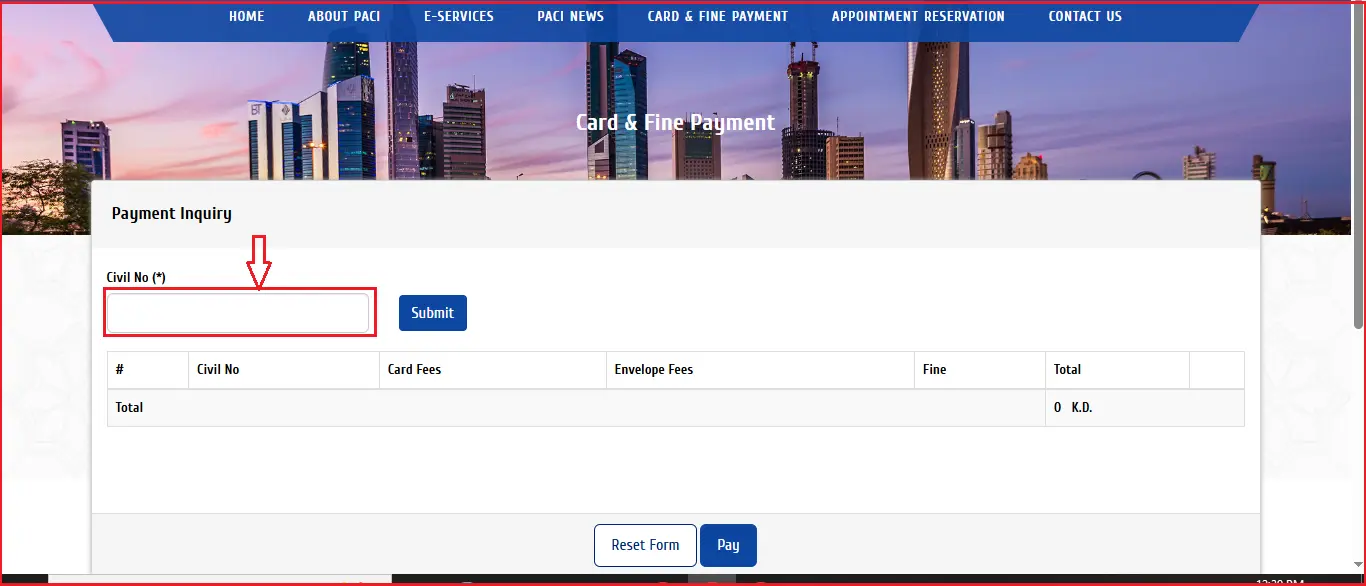
3. Enter your Civil ID number.
4. Click Submit.
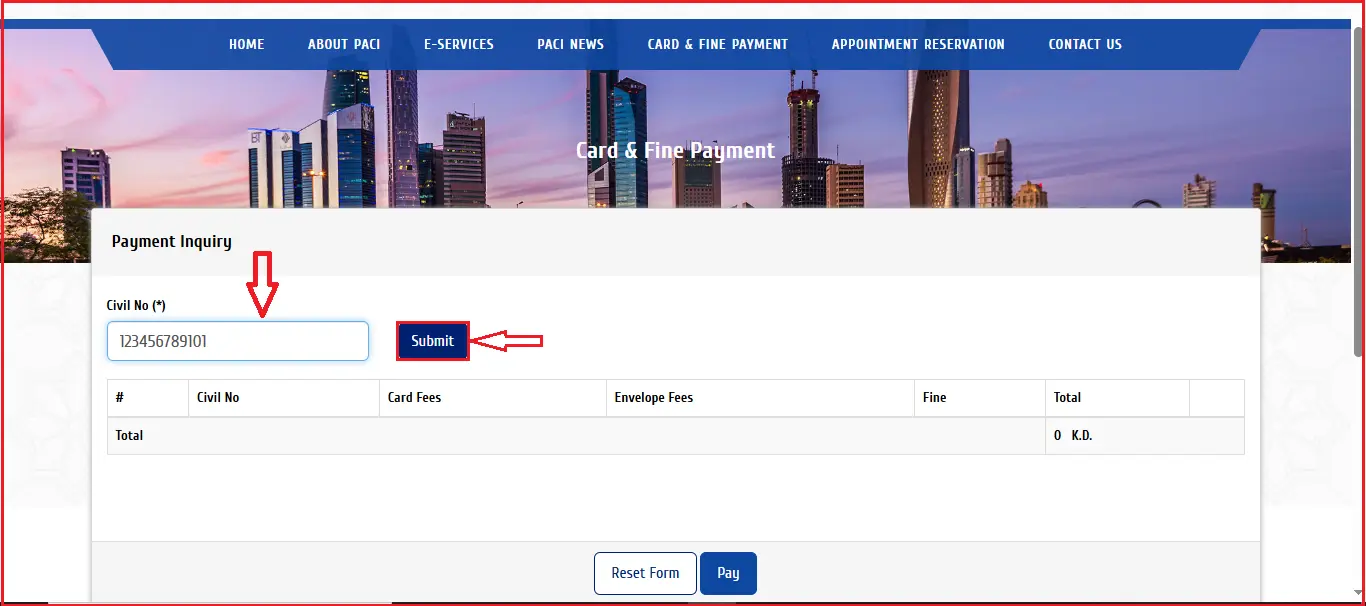
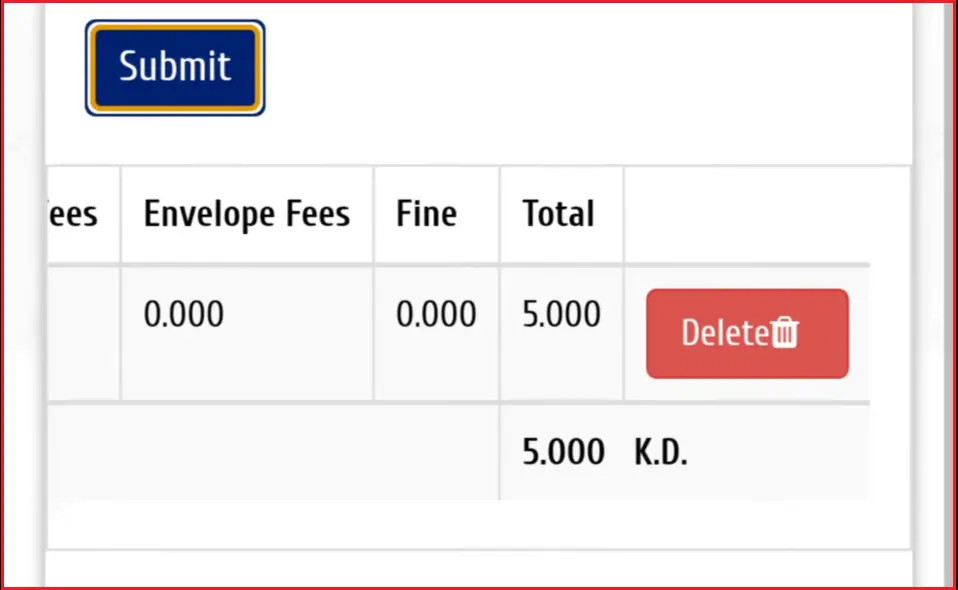
5. Your fine amount, if any, appears on screen instantly
Using the Sahel App
- Open the Sahel app and log in with your Civil ID
- Tap Services, then select PACI Services
- Choose the Fine Check or Card & Fine Payment option
- Your outstanding fine shows up on the screen
Using the PACI Hotline (Call/SMS)
By Call:
- Dial 1889988
- Press 2 for English
- Press 1 for Civil ID services
- Enter your Civil ID number and listen for your fine details
By SMS:
- Type R followed by your Civil ID number
- Send it to 1889988
- You’ll receive a text reply showing your fine amount, if any
Types of Civil ID Fines and Amounts
There are many types of fines. The most common fines are given below.
Late Renewal Fine
This is the most common fine. It starts if the civil ID expires. The fine grows daily, starting at a lower rate and increasing after the first month. Renew your civil ID as soon as possible.
Lost/Damaged Card Fine
It is a replacement fee charged when you need a new card because your old one was lost or damaged. It should not be considered a fine.
Other Violation Fines
A few other situations can also trigger a fine:
Civil ID Fine Amounts
Fine Type | Amount |
|---|---|
Late Renewal (1st month) | 2 KD/day |
Late Renewal (after 1st month) | 4 KD/day (capped at 1,200 KD) |
Lost/Damaged Card Replacement | 20 KD |
Newborn Civil ID Not Registered (after 60 days) | 20 KD |
Address Not Updated | Up to 100 KD |
Note: Fine amounts can be updated by PACI, so always check the official website for the latest updates.
How to Pay Civil ID Fines Online?
Here are two main methods to pay your fine, briefly explained. Follow the one that suits you.
Using the PACI Website
- Go to services.paci.gov.kw
- Click on Card & Fine Payment
- Enter your Civil ID number
- Click Submit to view your outstanding fine
5. Click Pay
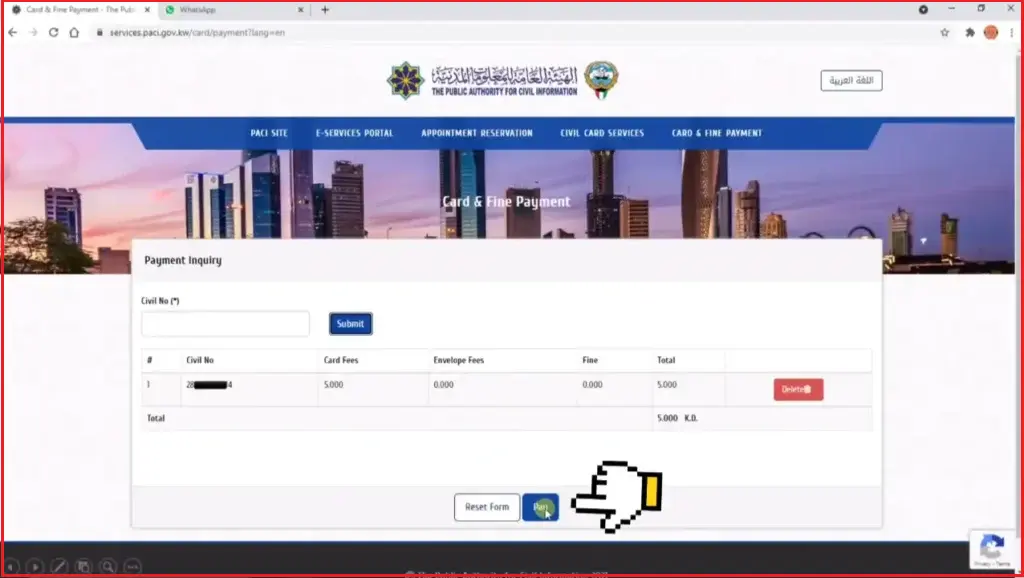
6. Select your bank and enter your K-Net card details
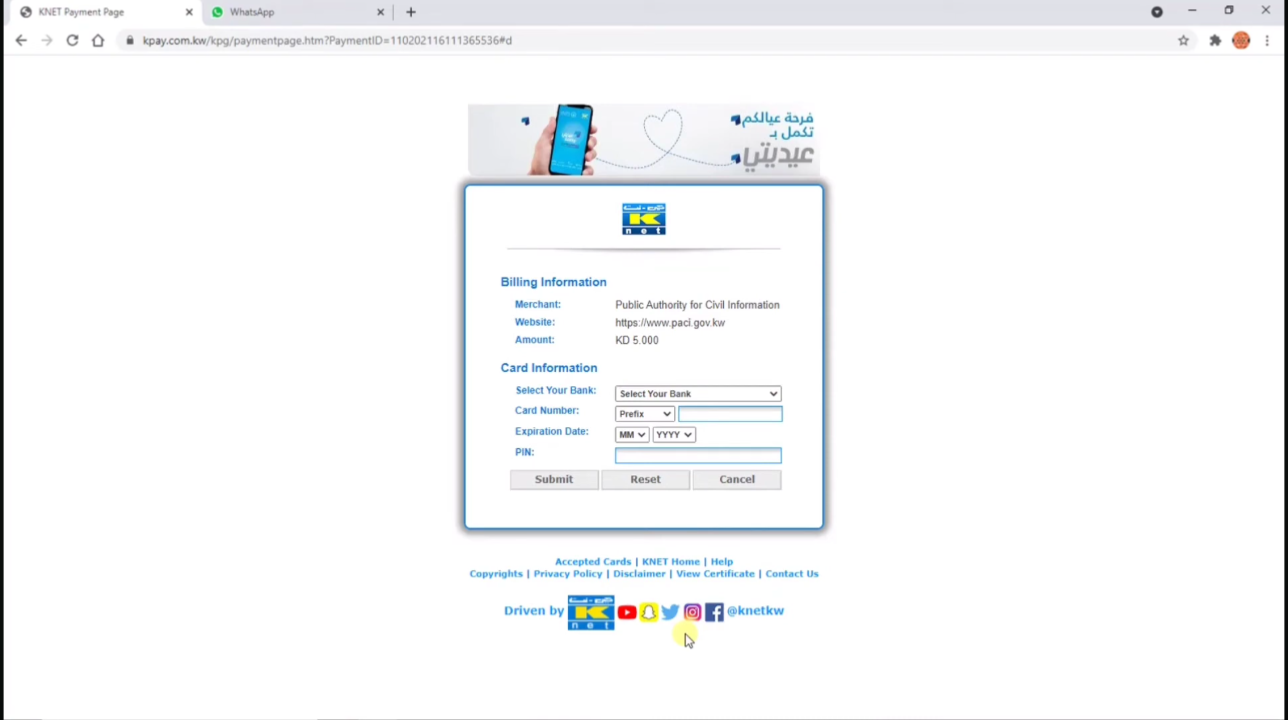
7. Confirm the payment and save your receipt
Using the Sahel App
- Open the Sahel app and log in with your Civil ID
- Tap Services, then select PACI Services
- Choose Fine Payment
- Confirm the fine amount shown on screen
- Enter your K-Net card details
- Submit to complete the payment
Only K-Net debit cards issued by Kuwaiti banks are accepted. Foreign Visa or Mastercard cards are often declined. Keep your Civil ID payment receipt, since you may need it as proof if your renewal or status doesn’t update right away.
⚠️ What Happens If You Don’t Pay Your Fine
Your fine keeps growing daily until it’s paid. PACI will also block your Civil ID renewal or replacement until it’s cleared. In some cases, unresolved fines can affect other government services linked to your Civil ID, so it’s best to pay as soon as possible.
Common Fine Check Issues and Fixes
You may face trouble during your Kuwait Civil ID fine check. Don’t worry, here are simple solutions for some common problems.
Fine Not Showing Up
If you expect a fine but nothing appears, double-check that you entered your Civil ID number correctly. If it is correct and still shows nothing, your fine may not be added to the system yet. Try again after a few hours, or call PACI on 1889988 to confirm.
Amount Looks Incorrect
Fine amounts can change if you paid a part of it earlier or if the daily rate increased after the first month. Contact PACI directly with your Civil ID number so they can check your exact record.
Paid but Still Showing as Due
This is usually just a delay in the system updating, and it often clears within a few hours. Avoid paying twice. If it’s still showing as due after 24 hours, keep your payment receipt and contact PACI to confirm the payment on their end.
Note: Here is what to do if your Civil ID is lost.
Frequently asked questions
Final Words
Checking your Civil ID fine online is easy. Follow the given methods to check Civil ID fines and pay online. Don’t delay paying, because fines will increase over time. Always visit the official website to check updated fine amounts.
