Kuwait Civil ID Payment Online – Complete PACI Guide
Complete your Civil ID payment online in no time. It is easy and simple, not very complicated. PACI’s system supports all types of Civil ID payments, including card renewal, first-time application, and lost card replacements, all online. The guide covers each payment step briefly and solves common problems.
Understanding Civil ID Payment in Kuwait
Read this before paying.
Civil ID Kuwait has a standard fee of 5.250 KD. It varies for different tasks. I have explained each payment type and the fee schedule.
When do you need to pay?
You will need to pay at a few different points, depending on your situation.
Mostly, payment happens as part of the application or renewal process itself — not as a separate step afterward.
Civil ID fee schedule
Service | Fee |
|---|---|
New Civil ID / Renewal (standard) | 5.250 KD (5 KD card + 0.250 KD envelope) |
Domestic Worker Civil ID | 2 KD |
Replacement of damaged or lost Civil ID | 20 KD |
Home Delivery | 2 KD (+0.250 KD per extra card) |
Late Renewal Fine (1st month) | 2 KD/day |
Late Renewal Fine (after 1st month) | 4 KD/day (max 1,200 KD) |
Personal Data Update (address, etc.) | No fee |
How to Pay Civil ID Fees Online (Easy steps)
Here is a detailed tutorial about Civil ID fee payment online. Follow each step exactly for a smooth payment.
Using the PACI Website
- Go to services.paci.gov.kw
- Click on Card & Fine Payment
- Enter your Civil ID number
- Click Submit
- Your fees or dues will show up on the screen
- Click Pay
- Select your bank and enter your K-Net card details
- Confirm the payment and save your receipt
Your payment usually confirms right away. If your status shows “Pending Payment,” the fee hasn’t gone through yet — try again or check your card balance.
Using the Sahel App
If you prefer paying from your phone, the Sahel app works just as well.
- Open the Sahel app and log in with your Civil ID
- Go to Services, then select the Civil ID payment option
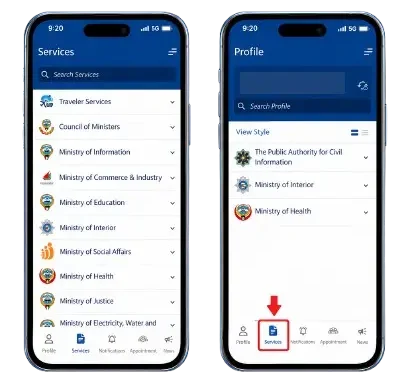
3. Open the Ministry of Interior and select e-payment options.
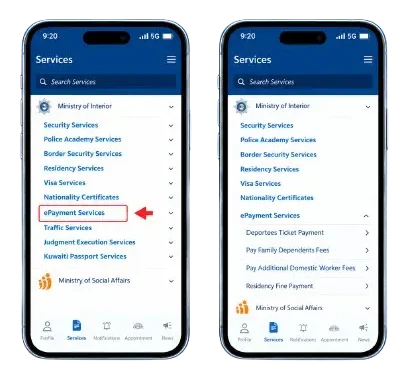
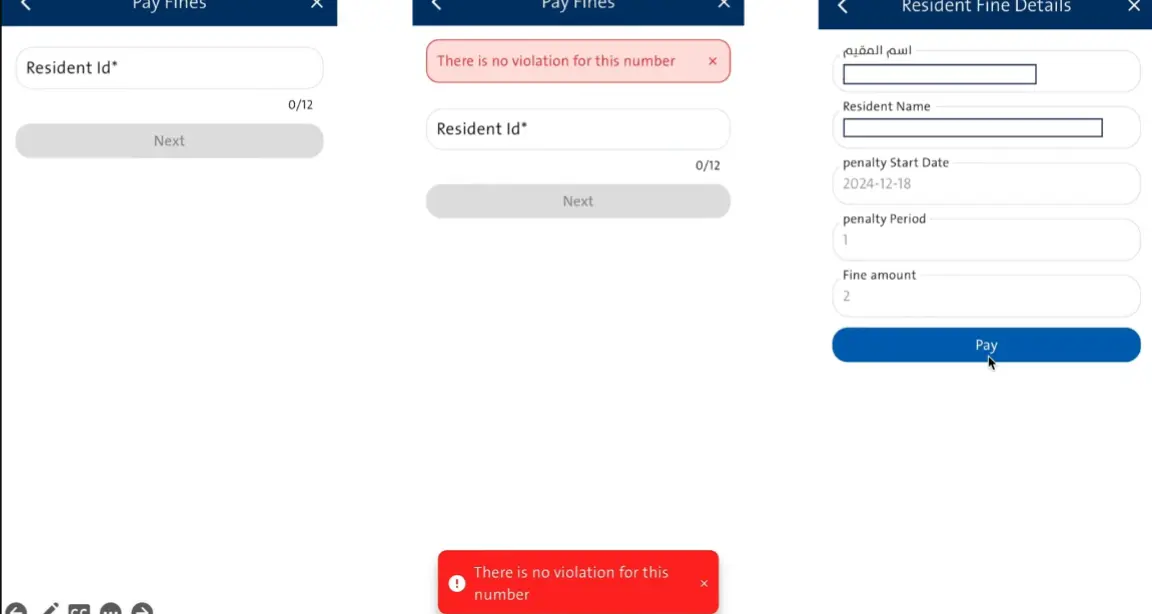
4. Fill in the required details
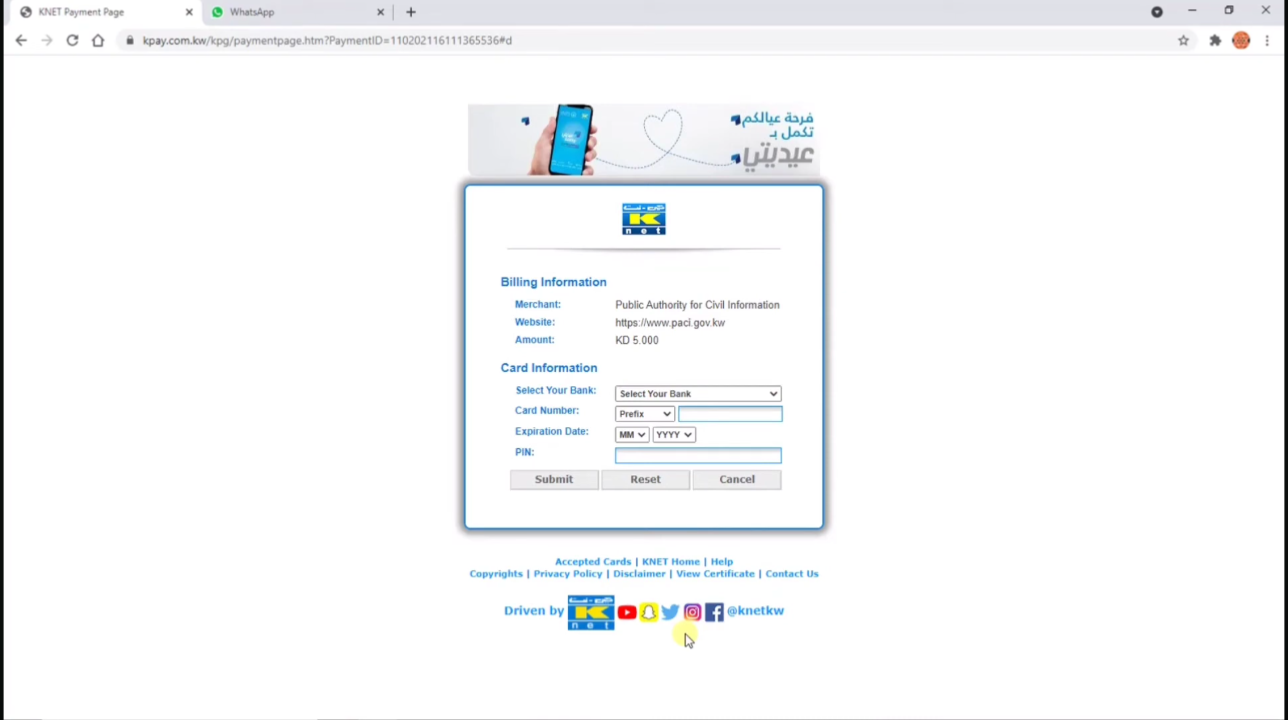
5. Enter the K-Net card details and press “Pay Now”
You’ll get an e-receipt in the app — keep a copy for your records. After successful payment, check Civil ID status to confirm your card status.
Which debit card is used?
Only the K-Net card is used to pay for Civil ID fees. Both the website and the app use the K-Net card method. Foreign Visa or Mastercard will not be accepted by Kuwait banks. Make sure you have the required amount in your account. You will receive a receipt after successful payment.
Important: “Always save your receipt. You’ll need it if there’s any issue with your payment later, tracking delivery, or collecting the card. “
Paying Civil ID Fees Offline
Have no internet or prefer in-person payment. Here are some offline methods to pay the Civil ID fee.
At PACI Service Centers
You can pay your Civil ID fees directly at any PACI service center. This usually happens as part of your application, renewal, or replacement visit. Just bring your Civil ID number and a K-Net card, since cash isn’t typically accepted. A staff member will process your payment and give you a receipt on the spot.

Via SMS Service

If you’re not near a computer, you can also pay by text. Open your messaging app and type R followed by your Civil ID number, then send it to 1889988. You’ll receive a reply with a payment link. Open the link, enter your K-Net card details, and submit. A confirmation message with your receipt number follows once the payment goes through.
Civil ID Payment: Online vs Offline
A detailed comparison between online and offline payment is given:
Options | Online | Offline |
|---|---|---|
Where | PACI website, Sahel app | PACI center, SMS |
Payment | K-Net card | K-Net card, no cash |
Time | 2–5 minutes | 15–30+ minutes |
Visit Needed | No | Yes (except SMS) |
Receipt | Instant e-receipt | Printed or SMS link |
Availability | 24/7 | PACI hours only |
Internet | Required | Not required |
Best For | Quick fee payments | In-person visits |
Common Payment Issues and Fixes
You may face problems during fee payment. Don’t worry, you are not alone; I have provided simple solutions. Just follow the given solutions to solve common issues.
Payment Declined
Usually caused by a low balance, a foreign (non-K-Net) card, or a typo in your card details. Double-check everything and try again, or contact your bank if it still fails.
Payment Successful but Status Not Updated
This is often just a sync delay and usually clears within a few hours. Avoid paying twice — if it’s still not updated after 24 hours, contact PACI with your receipt.
K-Net Not Working
Often a bank-side issue. Try the Sahel app instead of the website, clear your browser cache, or contact your bank to confirm K-Net is active.
Frequently asked questions
Final Words
Civil ID Payment is now easy with Online payment methods. Don’t delay your payments. Follow the given steps and make online payments successfully. Always use PACI’s system to avoid mishaps and scams.